
The Basic offer table shows your Volume offer's information on each product page: the quantity requirement of each Volume tier, the discount of each tier, and the original and discounted prices. It can be used with every type of Volume offer.
How to choose between Basic offer table and Quantity Selector
Updated last month
To help you promote your Volume offer better, our app provides 2 useful widgets on your storefront: Basic offer table and Quantity selector table. If you're still wondering which one you should choose to display, this article might make your decision a little bit easier.
What is the Basic offer table
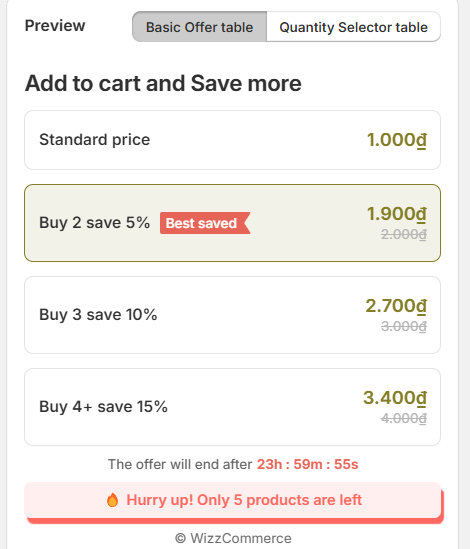
The basic offer table is mainly served to show information about your Volume offer on each product page. On the table, there will be information about:
Quantity requirement of each Volume tier
Discount of each tier
Original prices and discounted prices
With these information, it will encourage customers to add more items to cart. The table has an interactive option. If you enable this, your customers will be able to add items to cart from the table quickly.
What is Quantity selector table
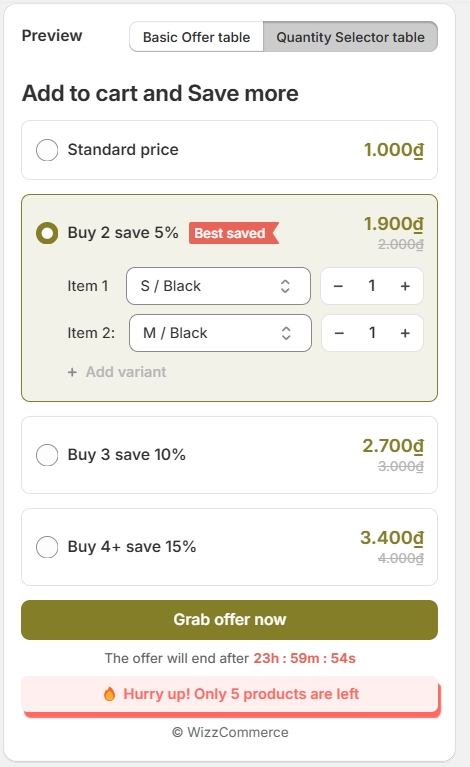
The Quantity Selector table also serves to show Volume offer but with more options for action. Apart from showing information like the Basic offer table, the Quantity Selector table allows:
Choosing specific product variants within the table
Adjust quantity to add to cart (add more product or remove product)
Add product with different variants to cart.
Notes: Quantity Selector table only allows you to add or remove the same product. It cannot add different products in Volume discount to cart.
Comparison table
Basic offer table | Quantity selector table | |
Display location | Product page | Product page |
Interaction | Add to cart | Add to cart Select variant Select quantity |
Use case | Can be used with every type of volume offer | Not optimal for Mix-n-match Volume offer, since the table cannot add mixed products to cart |
For the full widget setup, see Set up Volume offer.
Need more help?
If you experience any issues or have questions, please don't hesitate to contact our support team at [email protected] or through our live chat - we're here to assist you!
FAQ
What is the Basic offer table in Snap Bundle?
What is the Quantity Selector table in Snap Bundle?
The Quantity Selector table displays your Volume offer with more action options. Besides showing the same information as the Basic offer table, it lets customers choose specific product variants, adjust the quantity to add to cart, and add products with different variants to cart.
What is the difference between the Basic offer table and the Quantity Selector table in Snap Bundle?
Both tables display on the product page and let customers add to cart. The Basic offer table shows Volume offer information and, when its interactive option is enabled, lets customers add items to cart from the table. The Quantity Selector table additionally lets customers select variants and adjust quantity.
Which widget should I use for a Mix-n-match Volume offer in Snap Bundle?
The Quantity Selector table is not optimal for a Mix-n-match Volume offer, because it cannot add mixed products to cart. The Basic offer table can be used with every type of Volume offer.
Can the Quantity Selector table add different products to the cart?
No. The Quantity Selector table only lets you add or remove the same product. It cannot add different products in a Volume discount to cart.
Can customers add items to cart directly from the Basic offer table?
Yes. When you enable the interactive option on the Basic offer table, customers can add items to cart from the table quickly.
Was this helpful?
Was this helpful?